
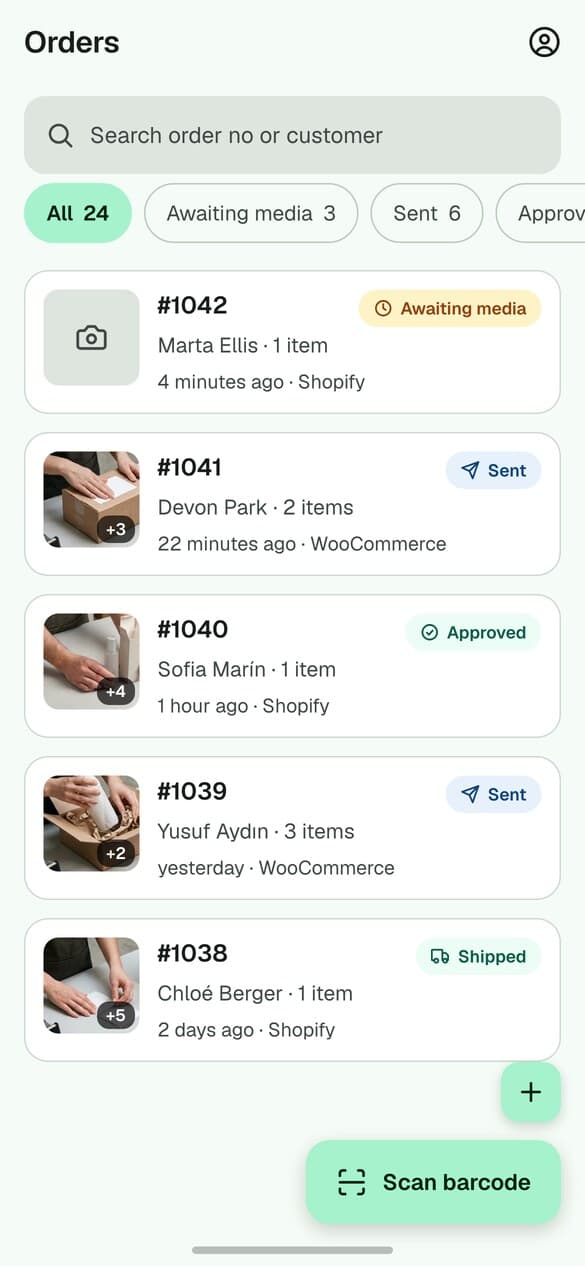
01
Open the right order
Choose an order from the mobile task list or scan a supported order or warehouse barcode with the phone camera. The matching record opens before capture begins.
PallasMark mobile app
Record what goes into a parcel on the phone your team already uses. Scan or open the order first, capture the packing step, then keep the recording with that order in PallasMark.
The mobile app is a companion to a PallasMark account. Create your workspace on the web, then sign in on iPhone or Android.
Scan to open a matching order
Keep the recording tied to its evidence record
Queue uploads when connectivity drops
The short answer
A packing video recording app captures the packing of an order on a phone and connects the file to the order record. PallasMark’s iPhone and Android app lets a packer open an order from a task list or barcode scan, record video or a photo, and upload the media into the PallasMark workspace.
The practical difference is the order link. A camera roll stores a clip by date or filename; an order-linked workflow lets a teammate return to the relevant order, review its evidence, and share a proof link when needed. PallasMark also fingerprints uploaded source media so a viewer can check whether the file matches the sealed record.
At the packing bench
The iPhone and Android app is built for a repeatable order workflow. The barcode connects the packer to the record; the person at the bench chooses when to capture.
Choose an order from the mobile task list or scan a supported order or warehouse barcode with the phone camera. The matching record opens before capture begins.
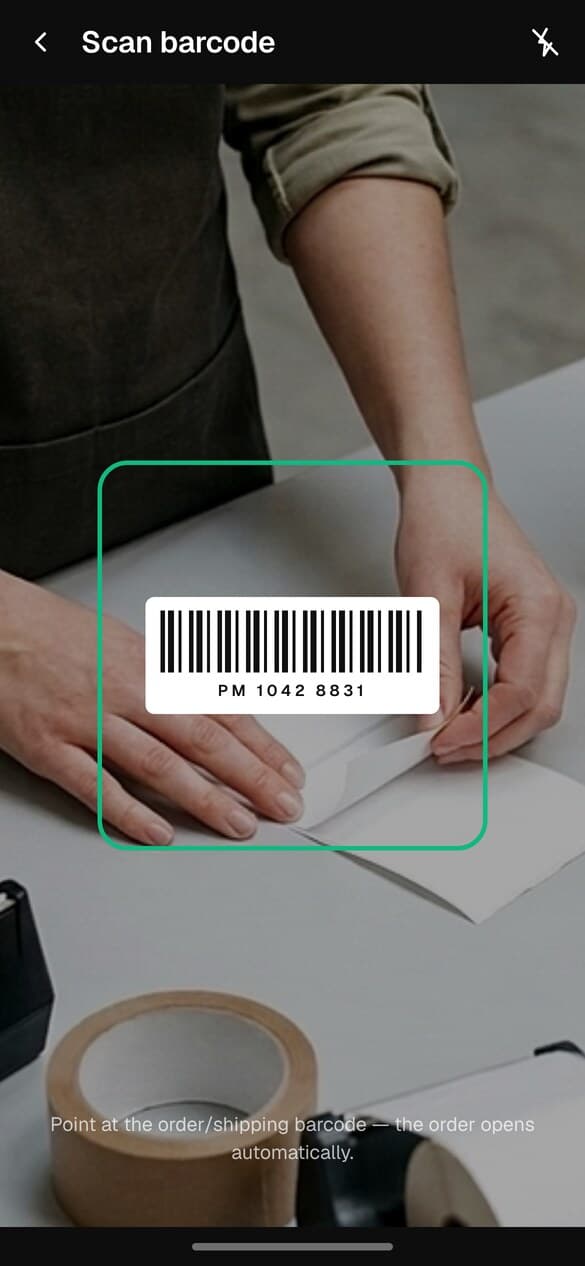
Use the phone camera to scan a supported order or warehouse barcode. PallasMark opens the matching record; the scan selects the order but does not start video capture.
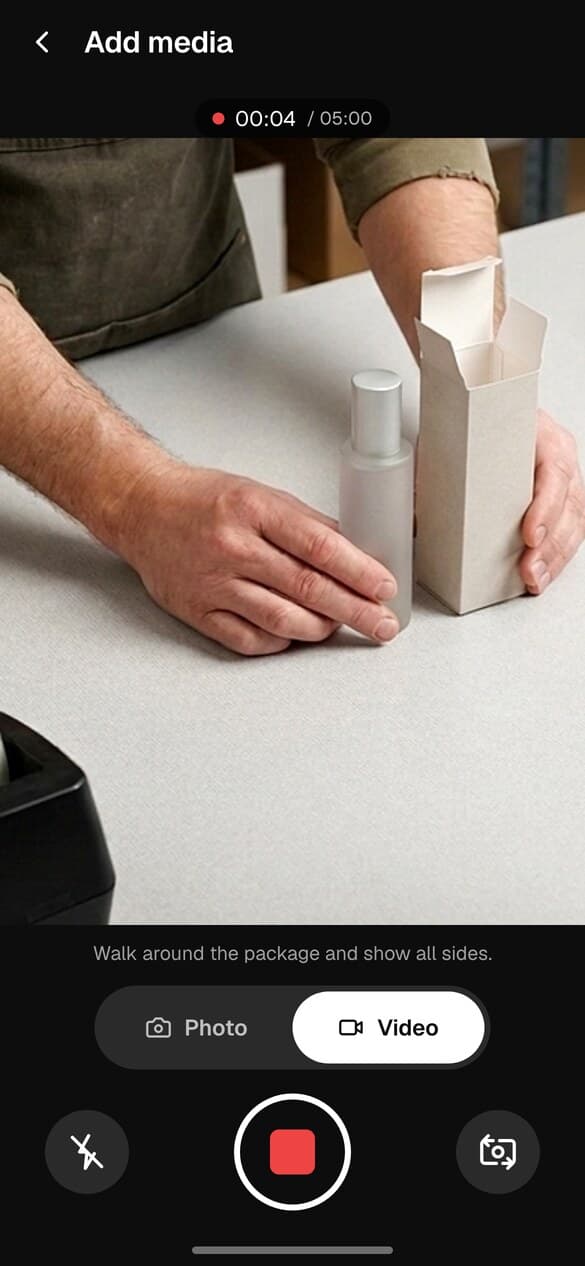
Show the item and relevant packing details in the camera frame, then record the video or take a photo. The packer starts the recording after the order opens; scanning does not silently start the camera.
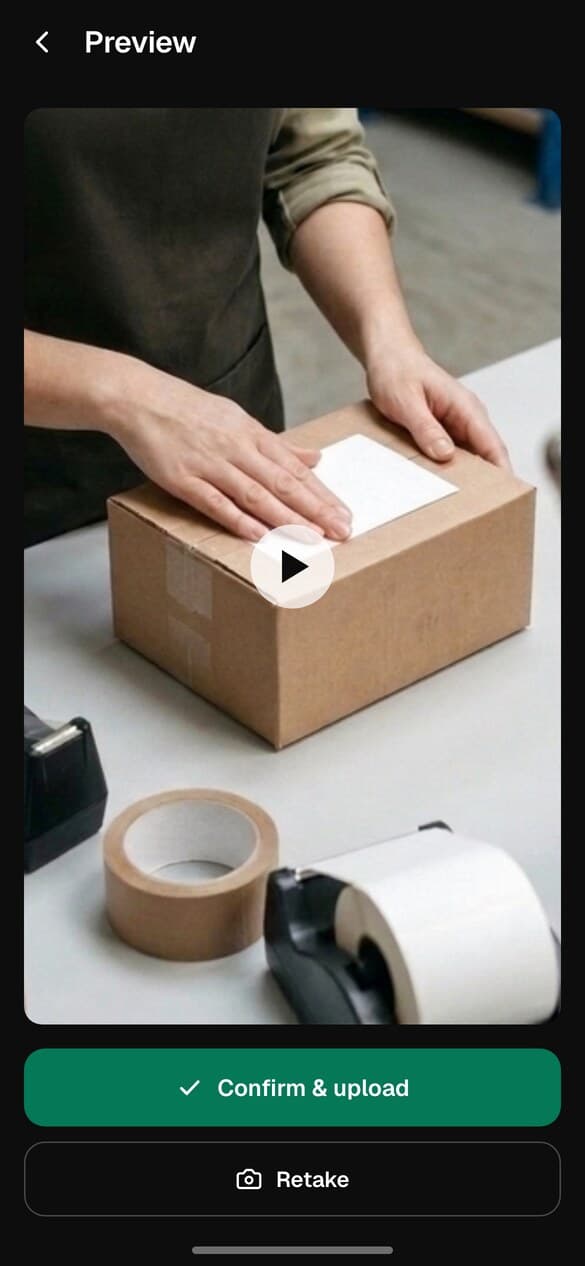
Review the captured media and confirm the upload. The app queues media and retries after connectivity returns; once uploaded, the evidence appears with its order record for later review or sharing.
Barcode workflow, explained
Use the phone’s camera to scan a supported order or warehouse barcode. PallasMark looks for a matching record in the selected workspace or connection and opens it. The packer then taps to record a video or take a photo.
This is different from a camera app that starts filming as soon as it sees any shipping label. PallasMark’s mobile flow is order-first: the record is visible before capture begins. If a label contains more than one barcode, the operator can choose the code that identifies the order or warehouse record.
Choose the right capture setup
These tools answer different operational questions. Use a phone app when you need a recording tied to a selected order; use a fixed camera when you need continuous coverage of a specific area and have designed the privacy controls for that purpose.
Commerce and fulfillment fit
The mobile app is a capture surface for PallasMark records. It does not create a native connector to every store or warehouse system by itself. Check the live integration directory before planning an automated sync.
Connect eligible Shopify orders and review the current evidence write-back scope.
View integrationUse the WooCommerce connection or its published setup guide.
View integrationCheck supported seller flows and order eligibility before rollout.
View integrationReview the current integrations directory or ask about an API workflow.
View integrationIf your store or WMS is not listed, see how integrations work and PallasMark’s developer API. Confirm the exact order fields and capture workflow with your team before purchasing around an unverified connector.
What the recording can support
A packing clip can show what was visible while an order was packed. It cannot establish facts outside its frame, replace a carrier’s delivery scan, or answer whether a cardholder authorized a purchase.
| Question being reviewed | What a clear packing recording can show | What it does not establish |
|---|---|---|
| “The parcel was empty” / “an item was missing” | The item shown going into the parcel, if the camera view and take are clear. | Anything hidden outside the frame or whether the same parcel reached the buyer unchanged. |
| “I never received it” | That a packing step was recorded before dispatch. | Delivery. Use the carrier’s tracking, delivery confirmation, and address evidence requested for that claim. |
| “The wrong or damaged item was sent” | The item and visible condition shown during the recorded packing step. | The condition after the camera stops, or whether a platform accepts video in its submission form. |
| “I did not authorize this payment” | The warehouse packing process for an order. | Cardholder authorization, device history, or the payment provider’s fraud requirements. |
For the broader capture, seal, and verification workflow, read packing video proof software. For a Shopify chargeback, check the current form requirements: Shopify says not to include video files or external links.
Connectivity and team rollout
The mobile app keeps captured media in an upload queue and can retry after connection interruptions. Offline barcode lookup uses orders already saved on the device; it cannot promise that a new order from a store can be fetched with no network.
For a team rollout, check that each person has the right workspace access, the phone has camera permission, the packer knows which label to scan, and someone checks the upload queue before the device is signed out or replaced.
Plan a warehouse workflowCaptured media waits in the local upload queue and retries after reconnection. New order lookups may need a network connection.
Plan capacity around monthly proof orders, team members, connected stores, and facilities shown in the current plan comparison.
Storage and plan fit
Under PallasMark’s current capture profiles, a five-minute recording is roughly 100 MB at 720p or 175 MB at 1080p. Treat these as estimates, not a storage quote: actual file size changes with duration and device, and photos, retained copies, and other workspace media also count toward your usage.
| Capture example | 720p estimate | 1080p estimate |
|---|---|---|
| One 5-minute video | About 100 MB | About 175 MB |
| Ten 5-minute videos | About 1 GB | About 1.75 GB |
Estimates use current configured video and audio bitrates and exclude other stored media. Plan availability and capture quality may change.
Choose a plan by workflow
Published plans show the current price, monthly proof-order capacity, storage, retention, team seats, connected stores, facilities, and video length. Plan values are live and should be checked before a rollout; this app page intentionally does not freeze a price or storage allowance.
Compare current plans and limitsPallasMark publishes a free plan; its current order and storage limits are listed on the pricing page.
Privacy at the packing bench
An order recording is not a blanket permission to monitor employees. Before recording identifiable people, document the purpose, assess whether the capture is necessary and proportionate, tell affected staff, restrict access, and set a retention period. Keep the camera aimed at the parcel and packing action when that is enough for the business purpose.
Rules differ by jurisdiction and workplace. The European Data Protection Board explains that video processing needs a legal basis and that people should be informed; consent is often difficult to rely on in an employment relationship. Ask your privacy lead or local counsel about the rules that apply to your warehouse.
Capture the order and packing step you need to document; avoid unrelated work areas.
Give access to the people who need the record to pack, review, or respond.
Use the published plan or agreement limits and a retention period tied to a real purpose.
Explain what is recorded, why, who can view it, and how long it is kept.
Submission rules matter
A recording may help your team investigate what happened, but it is not automatically an accepted upload in every claim system. Policies change and vary by claim type. Here are the current primary-source instructions checked while preparing this page.
Shopify currently says not to include video files or links to external resources in a chargeback response.
Evidence depends on the dispute reason, and the card company makes the final decision.
Amazon’s published delivery-related information includes proof of delivery, tracking, address, and carrier details.
PayPal describes proof of shipment or delivery for physical goods and reviews the documents submitted.
Identify the purpose and legal basis, inform people, and assess necessity, access, and retention.
Provider documentation can change. Check the live instructions for the specific order and claim before submitting evidence; this page is product information, not a guarantee of a dispute outcome or legal advice.
Mobile app questions
Direct answers about iPhone and Android availability, barcode scanning, store connections, offline uploads, privacy, storage, and evidence limits.
Yes. PallasMark has a mobile app for iPhone and Android, plus a web workspace. Install it from the Apple App Store or Google Play, then sign in with a PallasMark account. The app is a companion to the workspace, not a standalone recorder.
No. The PallasMark companion app is available for iPhone and Android. You can create and manage the workspace in a web browser, then use a supported phone at the packing station; the workflow does not require a Windows-only recorder.
Yes, for order-specific packing capture. The app uses the phone camera to record a selected order; it does not act as a continuous CCTV system. A phone can move between benches, while a fixed camera may suit a permanent station with a separate surveillance purpose.
No. Scanning a supported order or warehouse barcode opens the matching record. The packer then starts the video or photo capture in the app. This keeps the capture attached to the order the packer selected and avoids claiming automatic recording that the current workflow does not perform.
No separate scanner is required for the documented mobile workflow: the app uses the phone camera to scan a barcode or QR code. If you plan to use a specific Bluetooth or USB scanner, confirm that device’s compatibility with your setup before rollout.
PallasMark supports Shopify order workflows. Connect the store, open the relevant order in PallasMark, and record from the mobile app or another supported capture surface. See the Shopify integration page for connection details and current scope.
PallasMark supports WooCommerce order workflows, and the mobile app can be used to capture evidence for an order in the connected workspace. See the WooCommerce integration guide for setup and current requirements.
PallasMark lists an Amazon integration for supported seller workflows. Check the Amazon integration page for the current connection scope and order eligibility; do not assume every Amazon order type or fulfillment method is covered.
No product page should imply universal WMS compatibility. PallasMark supports the integrations listed in its directory and provides API options for some custom workflows. Check the directory or contact PallasMark with your WMS name and order flow before choosing a setup.
Captured media can stay in the app’s local upload queue and retry after connectivity returns. Offline barcode lookup is limited to orders already saved on the device, so a new order lookup may need a connection. Check the upload queue before signing out, removing the app, or changing devices.
There is no published universal seconds-per-order benchmark. The workflow is designed around opening the order, capturing the packing step, and uploading the media; actual time depends on the parcel, video length, network, and the checks your team chooses to show.
The workflow supports teams, warehouses, and more than one capture device. The number of team members, connected stores, facilities, monthly proof orders, and other limits depends on the published plan. Compare current limits before rolling the app out across stations.
Each capture is attached to an order or warehouse record rather than saved as an unlabelled camera-roll file. Open the order list, use the available filters, or scan a supported barcode to return to the matching record. PallasMark does not publish a universal lookup-time benchmark.
PallasMark can share evidence with a buyer through its available buyer workflows and provides a public verification page for a sealed file. Whether a carrier, marketplace, bank, or payment provider will accept a link depends on that organization’s current submission rules.
It can show what was visible during the recorded packing step, especially when the item, order context, and parcel closure are clear in the same take. It cannot prove anything outside the camera frame or establish that a carrier later delivered the parcel.
No app can guarantee a chargeback outcome. The relevant evidence depends on the dispute reason, payment provider, and submission rules; the bank or card network makes the final decision. A packing recording documents a packing step, not cardholder authorization or carrier delivery.
Shopify’s current chargeback evidence instructions say not to include video files or links to external resources. A PallasMark recording can remain an operational record, but submit only evidence in the format Shopify currently accepts and follow the instructions for the specific dispute.
Follow the instructions for that exact claim. Amazon’s A-to-z guidance identifies delivery details such as tracking and proof of delivery; PayPal Seller Protection focuses on valid proof of shipment or delivery. A packing video is not a substitute for delivery confirmation, and acceptance is not guaranteed.
PallasMark records capture and upload details and computes a SHA-256 fingerprint for uploaded source media, with a public page that lets a viewer check whether the file matches that record. This makes later changes detectable; it does not prove that every event outside the recording happened as described.
After upload, media is kept with the PallasMark workspace under the applicable plan or agreement. Retention and storage limits vary by the published plan and the order’s status. Media waiting to upload can remain in the mobile app’s local queue; see the current pricing page for plan limits.
As an estimate using PallasMark’s current capture profiles, a five-minute video is about 100 MB at 720p or 175 MB at 1080p. Actual size varies with the recording and device. For example, ten five-minute recordings are roughly 1 GB or 1.75 GB before other stored media; compare this with the storage and retention limits on the pricing page.
PallasMark’s published plans are organized around product limits such as monthly proof orders, storage, retention, team members, connected stores, facilities, and video length—not a simple camera-per-station license. Check the current pricing page for live prices and plan details.
PallasMark publishes a free plan. It is different from a time-limited trial; the available order volume, storage, and other limits are shown on the current pricing page and can change as the published catalog is updated.
It depends on the country, purpose, camera framing, notice, retention, and access controls. In the EU, identifiable video can be personal data; employers should establish a lawful basis, assess necessity and proportionality, tell affected people, and limit retention and access. Consent is not automatically the right basis for workplace monitoring. Get local privacy advice before recording staff.
Do not assume that it does. The mobile order workflow scans supported barcodes to find a matching order. Some warehouse label workflows can extract fields for a record, but that is not a promise of universal OCR for carrier tracking numbers or every shipping-label layout.
There is no universal acceptance rule. Shopify currently excludes videos and external links from its chargeback response form; Amazon and PayPal describe their own claim-specific evidence requirements. Check the live instructions for the claim and use the formats that organization requests.
Keep researching
These pages cover the wider product category, platform setup, warehouse context, and how to evaluate evidence without assuming a platform will accept every file type.
See the full workflow for order-linked recordings, proof verification, and buyer sharing.
Read guideExplore barcode-linked receiving and warehouse records for teams beyond ecommerce orders.
Read guideSee how the uploaded file fingerprint and public verification page work.
Read guideUnderstand where packing records fit within a claim-specific response.
Read guideCheck the current Shopify connection, order flow, and evidence write-back options.
Read guideSee how WooCommerce orders connect to the same mobile capture workflow.
Read guideCheck current Amazon seller workflow availability and order eligibility.
Read guideReview currently listed commerce and fulfillment connections before rollout.
Read guidePlan capture across warehouse benches, receiving, and assigned staff.
Read guideSee how evidence records fit client, facility, and fulfillment operations.
Read guideUse a consistent recording step to review what was packed and how.
Read guideRead a broader guide to choosing an order-linked packing video workflow.
Read guideRead the Shopify setup and workflow guide.
Read guideRead the WooCommerce setup and workflow guide.
Read guideStart with the phone your team already has
Connect the order flow, choose one packing station, and confirm the scan, capture, upload, and privacy steps with your team before expanding.